
Export guide
How to download your YouTube Studio data
Three steps with screenshots. Use the same date range for every download.
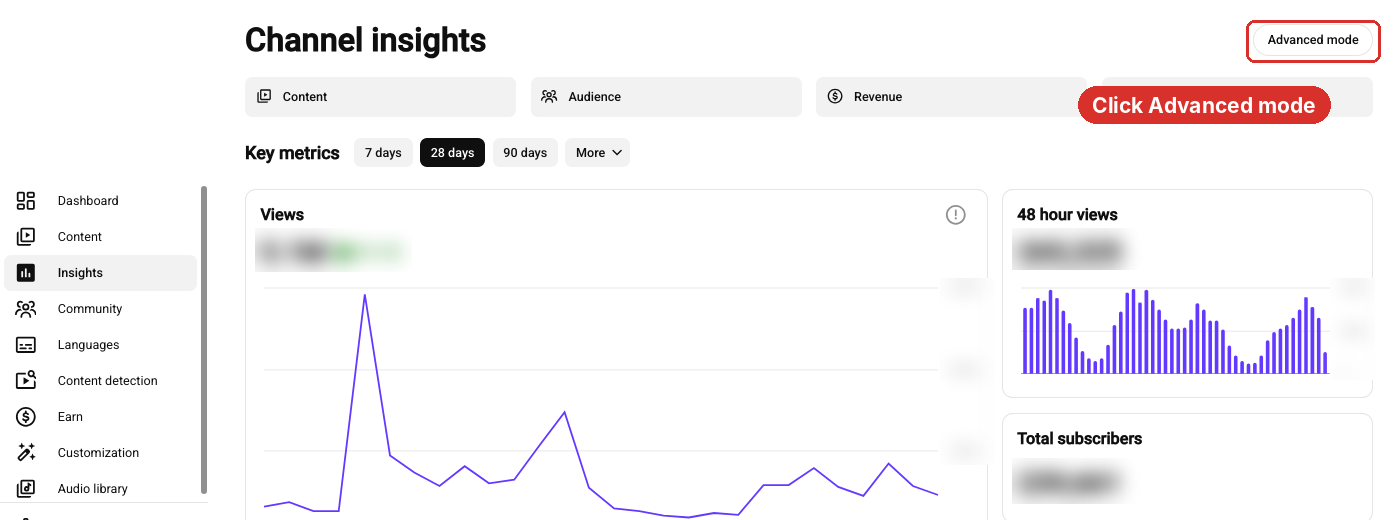
Open Advanced mode
In YouTube Studio, go to Analytics and click Advanced mode.
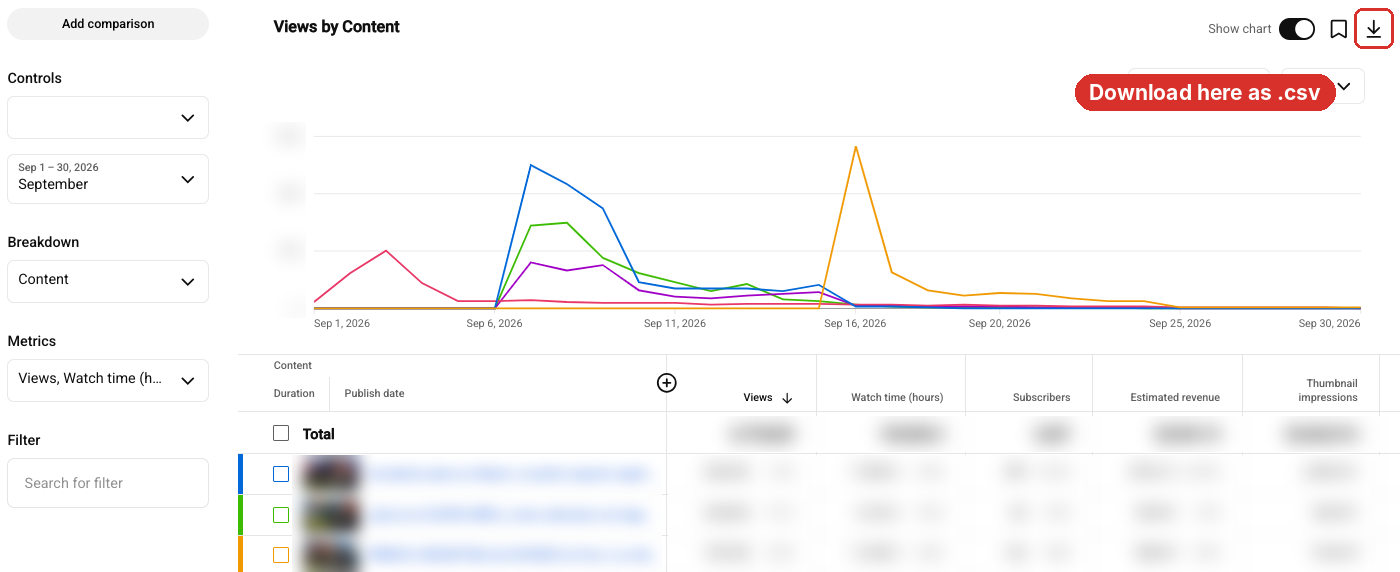
Export the Content table
Under Breakdown, select "Content", select the metrics, and download the table.
How to download: click Export current view above the table on the right, then choose "Comma-separated values (.csv)".
Metrics to select
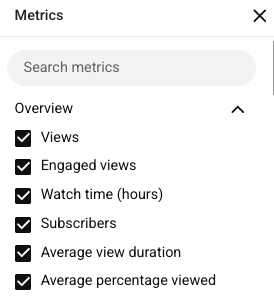
Overview
- Views
- Engaged views
- Watch time (hours)
- Subscribers
- Average view duration
- Average percentage viewed
Reach
- Impressions
- Impressions click-through rate
- Views (co-viewed)
Engagement
- Subscribers gained
- Subscribers lost
- Likes
- Dislikes
- Likes (vs. dislikes)
- Shares
- Comments added
Revenue
- Estimated revenue
- Transaction revenue
- Transactions
- Revenue per transaction
- RPM
Repeat for each breakdown
Use the same date range, choose another Breakdown, select its metrics, and download another .csv file. The more files you upload, the more complete your diagnosis will be.
| Breakdown | Metrics to select |
|---|---|
| Traffic source | Engaged views, views, average percentage viewed, watch time (hours), average view duration, impressions and impressions click-through rate. |
| Geography | Engaged views, views, subscribers, average percentage viewed, estimated revenue, watch time (hours) and average view duration. |
| Content type | Engaged views, views, subscribers gained and lost, average percentage viewed, videos published, impressions, impressions click-through rate, comments, estimated revenue, RPM, watch time (hours) and average view duration. |
| Audience by watch behavior | Engaged views, views, average percentage viewed, impressions, impressions click-through rate, watch time (hours) and average view duration. |
| Subscription source | Subscribers, subscribers gained and subscribers lost. |
| Device type | Engaged views, views, average percentage viewed, impressions, impressions click-through rate, average views per viewer and estimated revenue. |
| Revenue source | Estimated revenue. |
| Organic and paid traffic | Views, watch time (hours) and average view duration. |
| Date | Engaged views, views, subscribers gained and lost, videos published, RPM, watch time (hours) and estimated revenue. |
| Viewer age | Engaged views, views, average percentage viewed, watch time (hours) and average view duration. |
| Viewer gender | Views, average percentage viewed, watch time (hours) and average view duration. |
| Membership level and membership type (only if you offer memberships) | Total members, active members, members gained, members lost and cancellations. |
Have your files ready?
Upload them and receive your diagnosis the same day.
Need help downloading your data?
Let Claude download them for you
FreeWhat you need:
- Chrome with YouTube Studio signed in
- The Claude in Chrome extension
- A paid Claude plan
I’ll handle it for you
€290The diagnosis with data extraction handled by me costs €290 and requires read-only access to your channel. Once payment is confirmed, I’ll email you to request access and take care of the rest.
Still have questions? Email me at sorayaapestegui@gmail.com